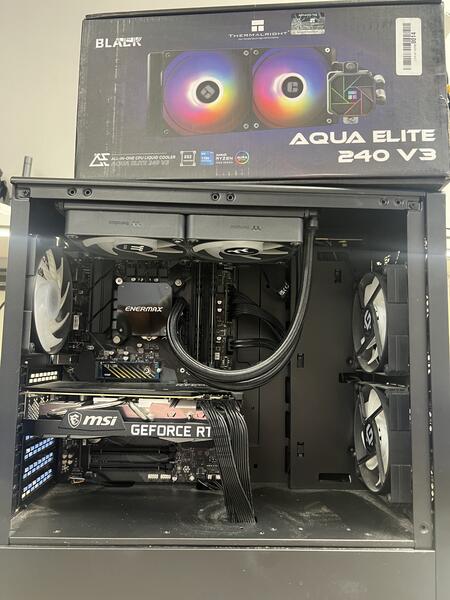
Customer Report of Gaming PC Overheating
A student from UCF brought in their gaming PC that was clearly overheating and underperforming. They searched for gaming pc overheating repair orlando hoping to get the issue resolved before important work and gaming sessions.
Common Reasons Gaming PCs Overheat
Key causes of overheating in high-performance gaming PCs include:
- Failed or inefficient liquid cooler / water cooler
- Dust and debris blocking radiator fins and fans
- Pump failure in AIO liquid cooler systems
- Improper mounting or airflow in the case
In this case, diagnostics confirmed the water cooler had failed, which caused the CPU and GPU to run at dangerously high temperatures.
Diagnostic Findings and Repair Process
Our technicians opened the system, tested cooling performance under load, and found that the pump in the water cooler was non-functional. We removed the faulty cooler and installed a new one with proper mounting, cooling paste, and tested the system thoroughly.
Repair Solution and Results
After replacing the cooler, the PC sustained normal temperatures under extended use and performance returned to expected levels. The student’s system was stable, quiet, and ready for gaming and study again.
Why Customers Choose FixStop
Gamers and students searching for gaming laptop cooling fix UCF, gaming pc overheating repair orlando, or laptop overheating repair orlando trust FixStop for effective, board-level and component-level repairs that bring systems back to life.