Custom Gaming Desktop Randomly Crashing in East Orlando
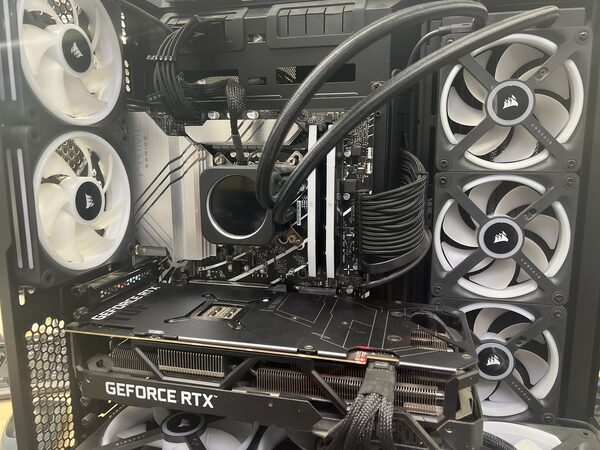
Recently, a customer brought their custom-built gaming desktop to FixStop in East Orlando because it was experiencing random crashes. For any gamer, having your setup crash out of nowhere can be incredibly frustrating, especially when you're in the middle of an intense session. Understanding the root cause of such issues is crucial, as it can not only save your progress but also prevent potential damage to your system.
What Causes Gaming Desktops to Randomly Crash?
Gaming desktops can crash for several reasons, but in this case, the issue was traced to a degraded processor. Particularly with Intel's 13th and 14th-generation processors, degradation can lead to instability, causing systems to crash unexpectedly. It's a common problem that many gaming enthusiasts face, especially those who push their systems to the limits. Other common causes for crashes can include overheating, faulty RAM, or issues with the power supply.
The Diagnosis at FixStop
When the customer brought in their gaming desktop, our first step was to conduct a thorough diagnostic. Our technicians examined the hardware and ran several tests to pinpoint the issue. It was determined that the processor was degraded, which is a known issue with specific Intel generations, and this was causing the random crashes. Identifying the degradation early can help in taking the right steps to prevent further complications.
The Repair Process Step by Step
Although the customer opted not to proceed with a repair, it's important to understand the typical steps involved in resolving such an issue:
- Processor Replacement: This would involve sourcing a compatible, non-degraded processor, ensuring it is properly installed and configured.
- System Testing: After installation, the system would be tested under various conditions to ensure stability.
- Cooling Solution Check: Ensuring that the cooling system is adequate for the new processor, to prevent future degradation.
These steps require precision and expertise, which is why it's always best to trust professionals with such tasks.
How Long Does a Processor Repair Take?
Replacing a processor can typically take a few hours, depending on the availability of parts and the specific configuration of the system. At FixStop in East Orlando, we aim for same-day service when possible, ensuring that our clients are back to gaming without long delays.
How Much Does a Processor Repair Cost in East Orlando?
The cost of a processor repair can vary, largely depending on the type and model of the new processor. Estimates are always provided upfront, and at FixStop, we offer free diagnostics to give our customers a clear idea of what to expect. Our competitive pricing ensures that you're getting great value for expert service.
Why Choose FixStop in East Orlando?
With over 12 years of experience, FixStop has become a trusted name in electronics repair in the East Orlando community. Located conveniently near UCF and Eastwood, we offer certified technicians, genuine parts, and a 90-day warranty on all services (excluding physical and liquid damage). Walk-ins are always welcome, making it easy for you to get your device assessed without the hassle of appointments.
If you're experiencing random crashes or any other issues with your gaming desktop, don't hesitate to bring it to FixStop. Our team is ready to provide a free estimate and get you back to smooth, uninterrupted gaming. Visit us today or give us a call to learn more about our services.